


Maintenance Machine Your PC, kept healthy.
One place to clear out junk, check your drives, repair Windows and fix connection problems — with every change shown to you first.
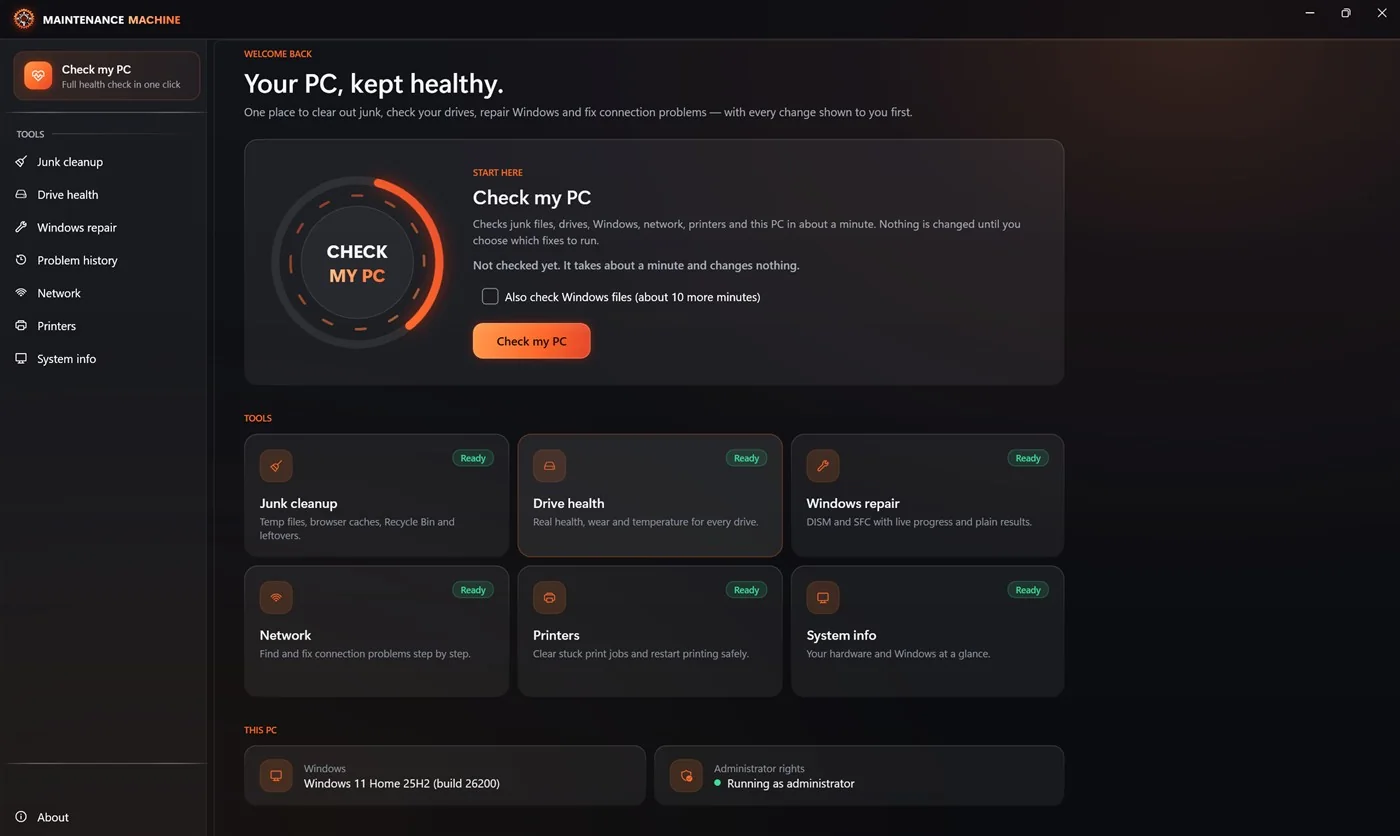
What is Maintenance Machine?
Maintenance Machine keeps your Windows PC healthy. Press Check my PC and in about a minute it looks at junk files, your drives, Windows, your network, your printers and the PC itself — without changing anything. Then you pick which fixes to run, and it tells you honestly what was done, what was skipped, and why.
Who it's for
- Anyone whose PC has got slow, full or flaky and wants it sorted without guesswork
- People who want to know if a drive is about to fail — before it does
- Families looking after a few home PCs (one key covers up to 3)
- Anyone tired of "PC cleaner" apps that invent problems to sell you a fix
What makes it different
- Nothing changes until you choose, and you see every change first
- Every number is read from your PC — no inflated problem counts
- No registry cleaner, no "RAM booster", no scare tactics
- One-time purchase; the checks stay free even after the trial
Check my PC: One Button, About a Minute
It looks first, asks second, and reports honestly at the end.
It checks — and changes nothing
Junk files, drives, Windows, network, printers and the PC itself, in about a minute. You can leave it running; nothing is touched.
You choose the fixes
Each recommended fix says what it changes and whether it can be undone. Tick the ones you want; skip the rest.
An honest report
What was done, what was skipped and what failed — and why, in plain words. No made-up "problems found" totals.
See It in Action
Click any screenshot to enlarge.
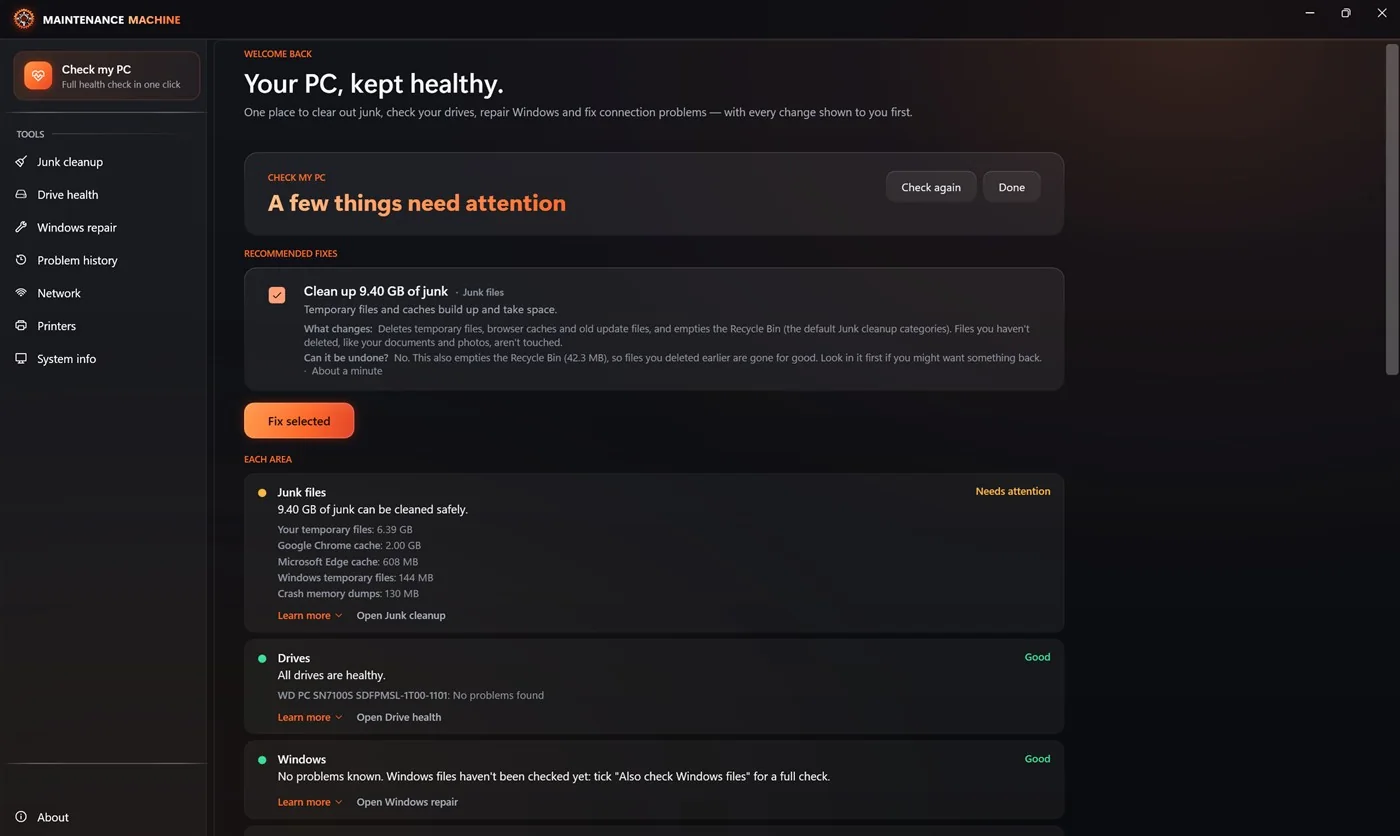 Check my PC — results in plain words
 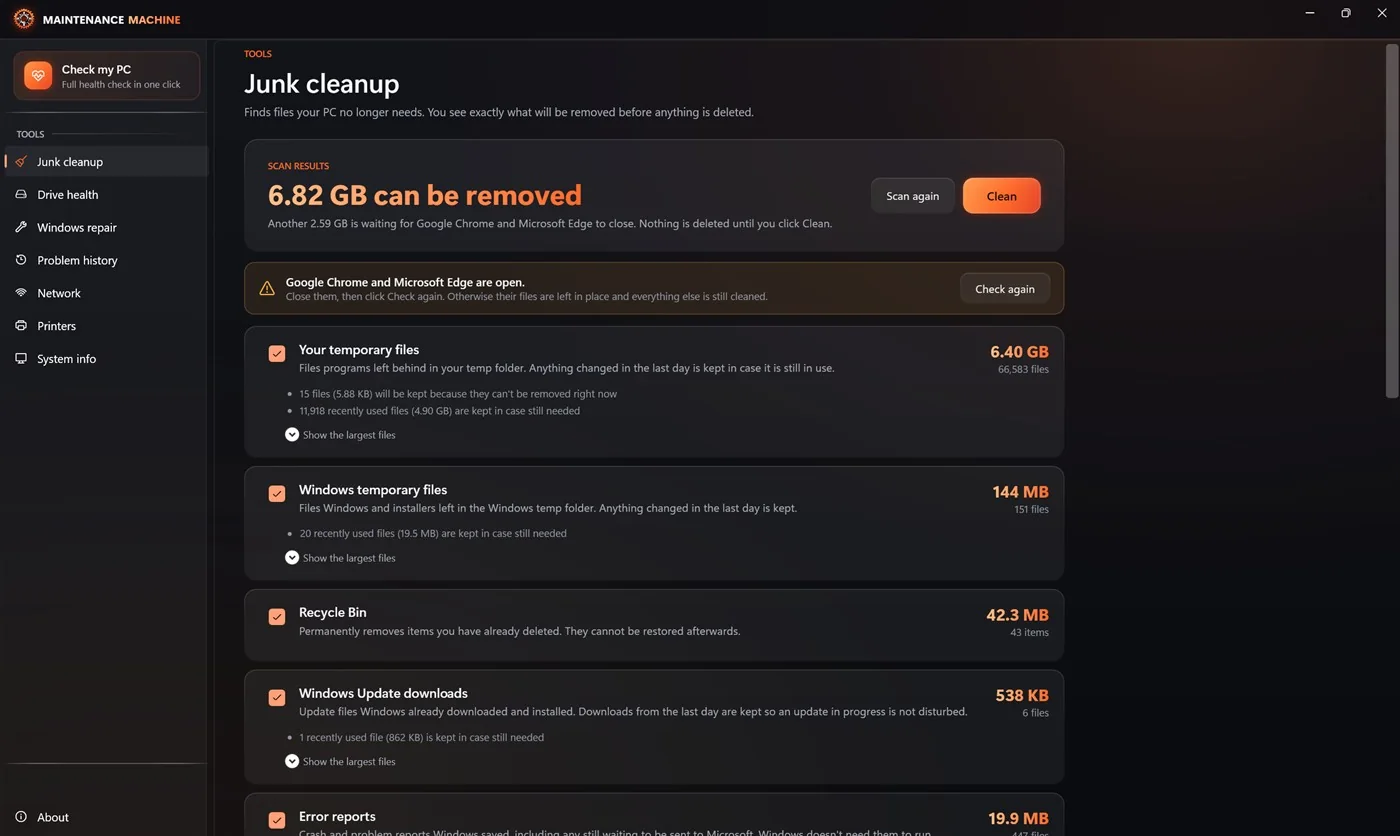 Junk cleanup — see it before it goes
 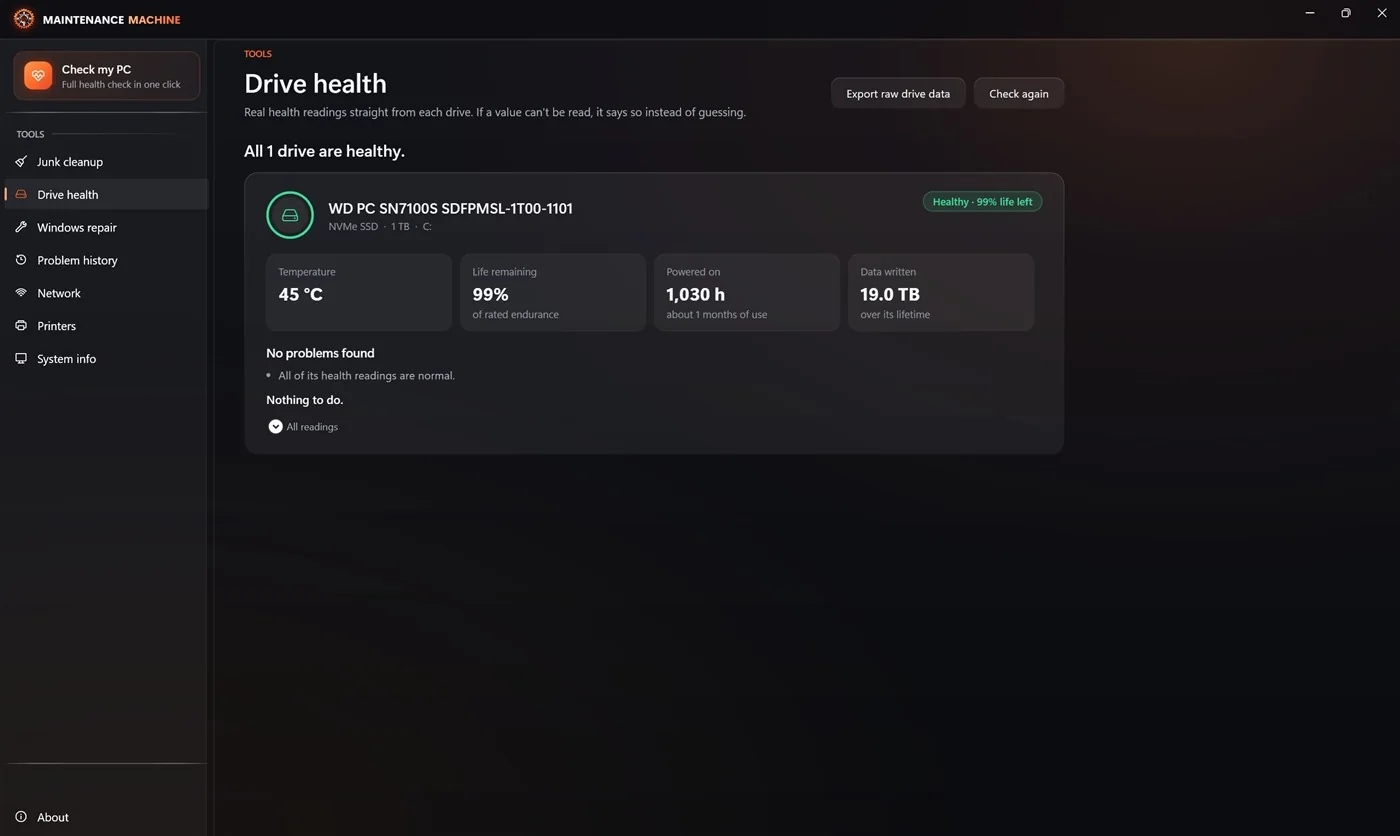 Drive health — real readings, plain verdict
 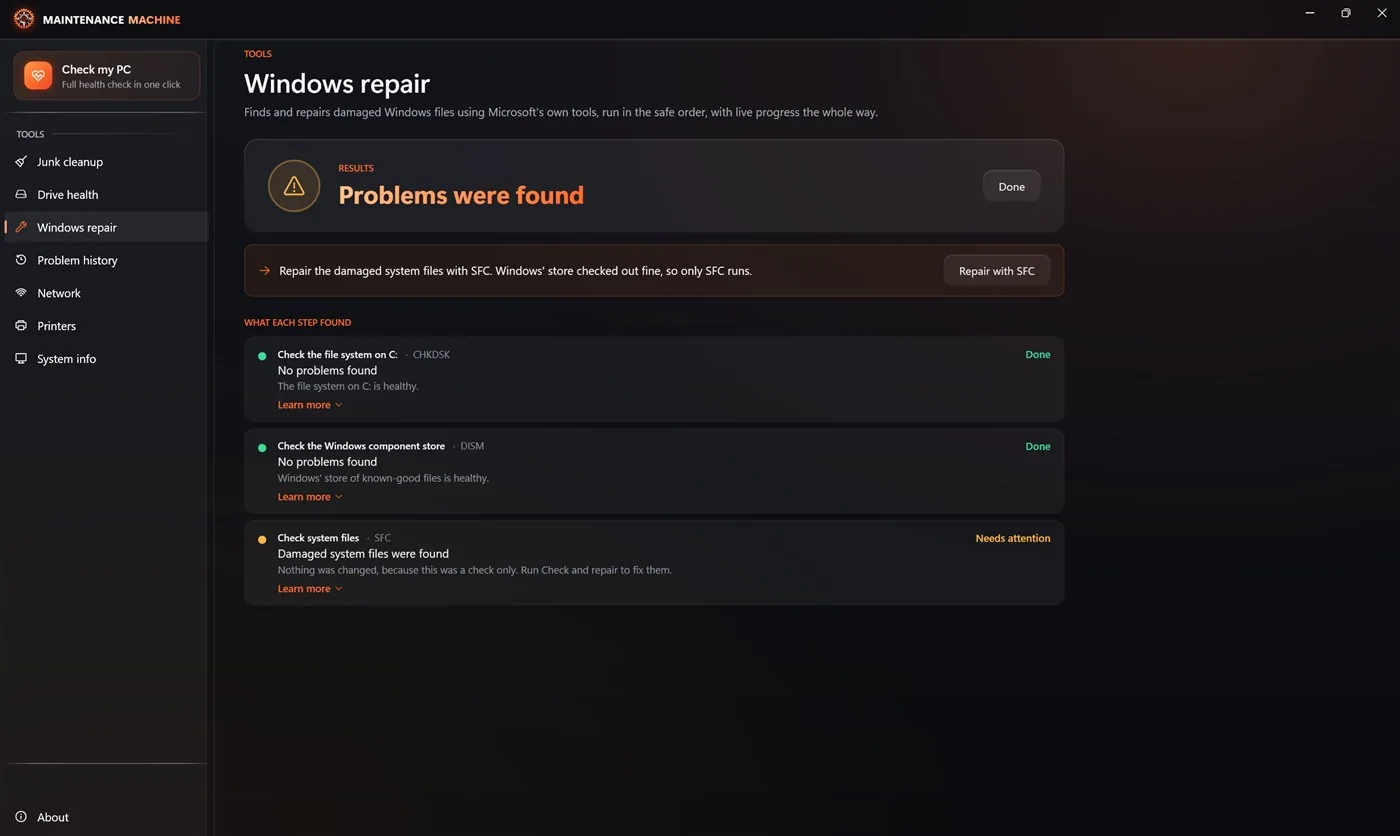 Windows repair — Microsoft's own tools, explained
 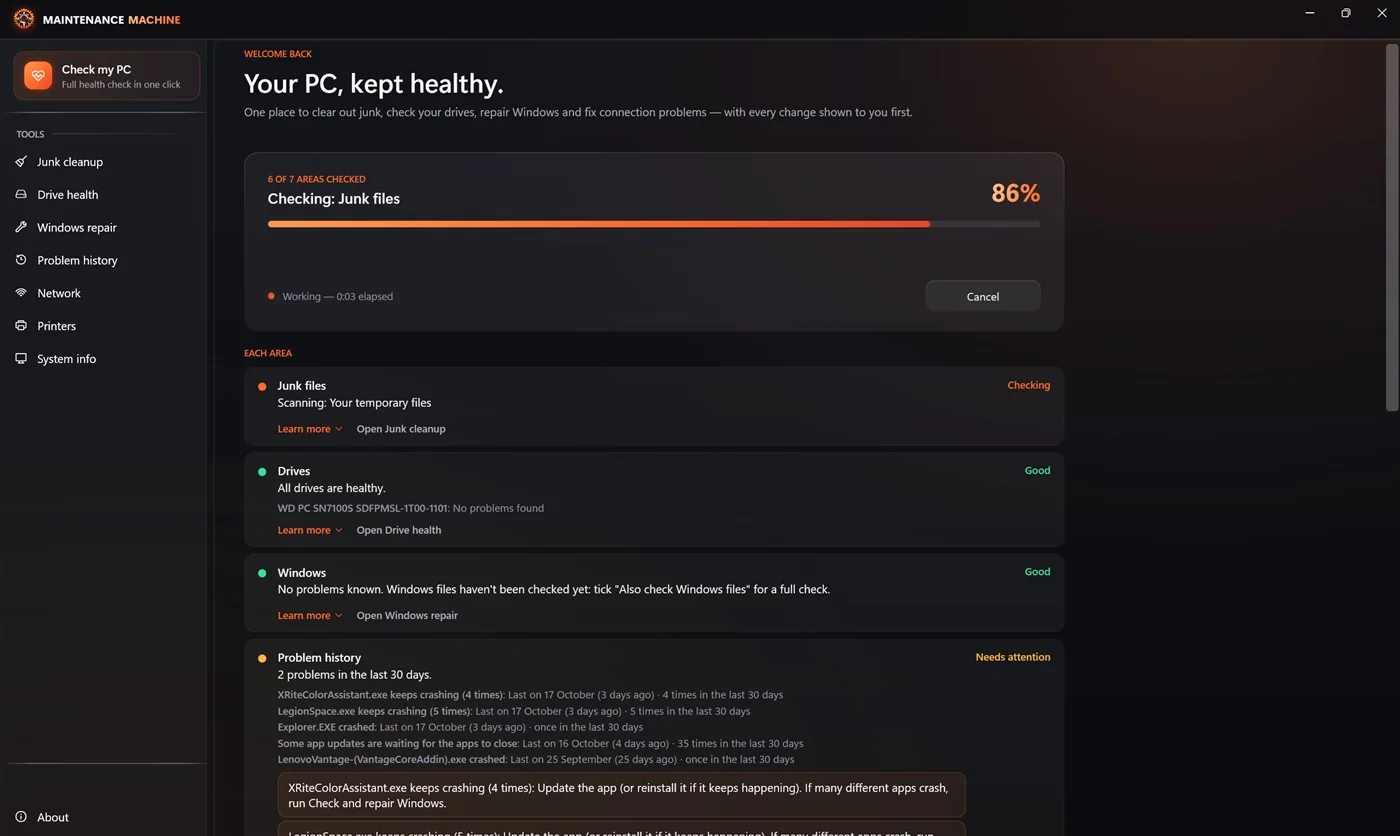 Check my PC — about a minute, changes nothing
 Everything It Does
Each tool works on its own too — Check my PC just runs them together.
Junk Cleanup
Temporary files, browser caches (Chrome, Edge, Firefox, Brave and Opera, every profile), the Recycle Bin, Windows Update leftovers, error reports, crash dumps and the thumbnail cache. It shows every file before deleting and never force-closes an open browser.
Drive Health
Real readings from each drive — temperature, life left, hours used, data written and errors — for NVMe, SSD and hard drives, with a plain verdict like "Back up this drive now". It never guesses: if a value can't be read, it says so.
Windows Repair
Microsoft's own tools — CHKDSK, DISM and SFC — run in the safe order, with a restore point first, live progress, time estimates and plain results. It never restarts your PC without asking.
Problem History
What Windows recorded — crashes, drive errors, failed updates, apps that keep crashing — explained in plain words instead of event codes.
Network
Finds where the connection breaks — the adapter, the address, the router, name lookups or the internet — fixes what a PC can fix, then checks that it worked. Wi-Fi and Ethernet.
Printers
Clears stuck print jobs, restarts printing safely, and explains why a printer shows as offline.
System Info
What's inside your PC, and a support report you can send to whoever helps you — so they don't have to ask.
Honest by Design
What it won't do matters as much as what it does.
Simple Pricing. Pay Once, Keep It Forever.
No subscription. $24.99 for 1 PC, or $39.99 for up to 3 PCs in your home — a year of updates included.
Pay once, keep it forever. A year of updates included; renew only if you want newer versions.
- Secure checkout by Stripe
- Key by email within a minute
- Try it free for 14 days first — sales are final
By buying you agree to the terms of sale and license. All sales are final.
Not sure yet? Download the free 14-day trial — everything unlocked, no card. After it ends, the checks stay free.
Renewing updates
Maintenance Machine keeps working forever. Your first year of updates is included; after that, renew only if you want the newer versions. The easiest way is inside the app: choose License in the sidebar, then Renew updates — it opens checkout with your key already filled in.
- Renew updates, 1 PC $12.99 / year Renew Renew updates, 1 PC
- Renew updates, 3 PCs $19.99 / year Renew Renew updates, 3 PCs
System Requirements
Frequently Asked Questions
What is Maintenance Machine?
Maintenance Machine is a Windows program that keeps a PC healthy. It clears out junk files, reads the real health of your drives, repairs Windows with Microsoft's own tools, and finds and fixes connection and printer problems — and it shows you every change before it makes it. One button, Check my PC, looks at everything in about a minute and changes nothing until you choose.
Is it a subscription?
No. It is a one-time purchase: $24.99 for 1 PC, or $39.99 for up to 3 PCs in your home. You pay once and it works forever. A year of updates is included.
What happens after the year of updates?
Nothing stops working. The version you have keeps running for good. If you want the newer versions released after your year, you can renew updates for $12.99 / year ($19.99 / year for 3 PCs) — only if and when you want them. How to renew.
How does the free trial work?
Install it and enter your email in the app; a 14-day trial key arrives by email and unlocks everything. No card. After the trial, all the checks stay free forever — Check my PC, Drive health, Problem history, System info and the scans. The fixes (cleaning, repairs, network and printer fixes) need a license.
Will it delete my files?
Only the junk you have looked at and chosen to clear: temporary files, browser caches, the Recycle Bin, Windows Update leftovers, error reports, crash dumps and the thumbnail cache. It shows every file first. Your documents, photos and other files are never touched, and it never force-closes an open browser.
Is it safe to use?
Yes. The installer and the program are signed by Beckham Enterprises, LLC, and Windows repair uses Microsoft's own tools (CHKDSK, DISM and SFC), run in the safe order with a restore point first. Nothing is changed until you choose, and it never restarts your PC without asking. There is no registry cleaner and no "RAM booster" — those tend to cause problems, not fix them.
Why does it ask for administrator rights?
Repairing Windows and reading drive health both need them; Windows does not let a normal program do either. It asks once, when it starts.
Does it need the internet?
Only for activating your key, the free trial, updates, and the download step of Windows repair. Everything else works offline. The network checks talk to the internet because that is what they test.
How many PCs can I use it on?
One key covers 1 PC ($24.99) or up to 3 PCs in your home ($39.99). To move it to a new PC, sign the old one out in the app, or at licenses.beckhamenterprises.com under Manage my computers.
I lost my key.
Sign in at licenses.beckhamenterprises.com with the email you bought with; your key is there, and you can have it sent again.
Can I get a refund?
Sales are final. Because the 14-day trial has everything unlocked, please try it first — and after the trial the checks keep working free, so you can see what it finds before you pay. If you were charged twice or never got your key, contact us and we will fix it. Details are in the terms.
Does it collect my data?
No telemetry and no tracking. The only times it goes online are the license check (with an anonymous machine id), checking for updates, the network checks themselves, and messages you choose to send from Help & feedback.

Download Maintenance Machine
Free 14-day trial of everything. After it ends, the checks stay free; the fixes need a license.
Download v2.0.6 for Windows Requirements: Windows 10 or 11 (64-bit) · administrator rights · about 250 MB · installer 79 MB
Signed by BECKHAM ENTERPRISES, LLC. Because it is new, Windows SmartScreen may show "Windows protected your PC" for the first while: choose More info, check the publisher says Beckham Enterprises, then Run anyway.
All versions · Manage your license
Looking After More Than a Few PCs?
Maintenance Machine comes from the same people who run ART Computer, a Vacaville IT shop. If you need hands-on help, or a business license for more PCs, talk to us.
Talk to Us