

LabelVault — label design and printing software for Windows, a one-time purchase with no subscription
Design, save, and print labels on any Windows printer. Thermal rolls, Avery sheets, Brother DK — with barcodes that scan, a thumbnail library you can actually read, and nothing in the cloud.
4-minute walkthrough: IntroLibraryNew labelEditorBarcodes & QRTablesLining upSavingLicensePrintingSettingsWrap Video page & transcript YouTube ↗
Read the transcript
Cold open Hey. This is LabelVault — a label designer and printer for Windows. You design a label once, save it, and print it whenever you need it. On a roll printer, a Brother, or a sheet of Avery labels through the office printer. Here's how it works.
The Library This is the Library. Every label you save shows up here as a card, with a little preview. Click one and it opens on the right, with the things you'd want to do with it: open it, print it as it is, make a copy, rename it, delete it. Right-click a card, and the same options are right there. Search finds a label by name. And up top is the folder they live in. Point that at a Dropbox or a shared drive, and the whole shop sees the same labels.
A new label New label. The first thing it asks is the size. Roll labels for thermal printers, Avery sheets by product number, Brother DK rolls — or type your own. Search for it, four by six, pick it — and there's your blank label.
The editor The tools are down the left. Text, barcode, QR code, image, lines and shapes, and a table. Click Text, and a text box lands on the label. Double-click it and just start typing — what you type shows up right on the label. Drag it to move it. Pull a handle to resize it. The little circle rotates it. Everything about it lives over on the right: the font, the size, bold, alignment. Auto-fit is worth knowing. With it on, the text shrinks to fit its box, so a long part number never runs off the edge of the label.
Barcodes and QR codes Barcodes. Click the tool, double-click the barcode, and type the value — the bars redraw as you type. The type is over on the right: Code 128 is the safe default, and there's UPC, EAN, Code 39 and more. QR codes work the same way. Type a link, a serial number, anything — and it's a code a phone can scan.
Tables Need a grid, like part, lot and quantity? That's the table tool. Double-click a cell and type. Rows, columns and the column widths are over on the right, and every cell keeps its own text — so it lines up like a proper form.
Lining things up When you drag, things snap to the label's edges and to each other, and the pink guides show you when they do. To line up more than one thing, shift-click to select them, and use Arrange: align them, space them out evenly, send one behind another. Down here is zoom. Type a number, fit the label to the window — or Real size, which shows the label exactly as big as it'll print.
Save it Save, give it a name, and it's in the Library. A label is one file — dot L B V — and it carries everything: the size, the fonts, the images. Copy it to another PC, open it there, and it's identical.
Your license Designing is free. Printing needs a license, or the free trial. Settings, License. Start free trial: type your email, and a thirty-day key lands in your inbox in about a minute. When you buy, the key arrives the same way. Paste it in, Activate — done. You buy a license for each PC you'll print from, and one key covers them all.
Printing Print. Pick the printer — any printer Windows knows about — how many, and go. If a printer puts things a hair off, use Test print. It prints an alignment box; nudge these until the box sits inside the label's edges. LabelVault remembers that per printer, so you fix it once. The black-and-white box keeps things crisp on thermal printers — leave it off for inkjet or laser.
Settings A few settings. Where your labels are saved. Inches or millimetres. Snap and grid. And a dark theme, if that's your thing.
Wrap And that's the tour — from a blank label to one coming out of the printer. Thanks for watching.
What is LabelVault?
LabelVault is label design and printing software for Windows. You design a label once — text, barcodes, QR codes, images, tables — save it as a file, and print it on any printer Windows can see: thermal roll printers, Avery sheets on a laser or inkjet, Brother DK rolls. It is a one-time purchase from $12.99 per PC, not a subscription, and it works fully offline.
Who it's for
- Shops and warehouses printing case, shelf, and shipping labels on thermal printers
- Small manufacturers who need barcodes that scan the first time
- Offices printing Avery address, file-folder, and asset labels from a shared folder
- Anyone tired of label software that needs an account, a subscription, or the cloud
Why one-time instead of a subscription
- Pay $12.99 per PC once; the license never expires
- A year of updates included; the version you have keeps working forever
- No account to create, no card for the trial, nothing stored online
- Volume pricing to $7.99 per PC; one key covers every PC in the order
How to design and print a label in LabelVault
Five steps, about five minutes the first time — watch the 4-minute walkthrough or read along.
- Pick a size. Press New label and choose the size: a thermal roll size, an Avery product number, a Brother DK roll, or type your own.
- Add text, barcodes and tables. Click a tool on the left — text, barcode, QR code, image, line, rectangle, table — double-click it and type. Drag to move, pull a handle to resize.
- Line it up. Items snap to the label edges and to each other; use Arrange to align, distribute and order them, and Real size to see the label exactly as it will print.
- Save it. Press Save and name the label. It is one .lbv file that carries the size, fonts and images, so it opens identically on another PC.
- Print it. Press Print, pick the printer and copies. If a printer prints a hair off, use Test print and nudge the offsets once; LabelVault remembers them per printer.
31 how-to guides — barcodes, tables, Avery sheets and every kind of label
Built for the Shop Floor
Three screens. Nothing to configure. Opens in a second — with or without internet.
Library
Every label in your folder as a thumbnail. Slide them bigger until you can read the text, see the exact size in inches and millimetres, and print straight from the card.
Editor
Text, barcodes, QR codes, images, lines, shapes, and tables. Drag, resize, rotate, snap, align. Double-click and type. Auto-fit text, today's date fields, unlimited undo.
Pick a printer, set copies, go. Per-printer alignment nudges, a test pattern, and a start-cell picker for half-used Avery sheets.
See It in Action
Click any screenshot to enlarge.
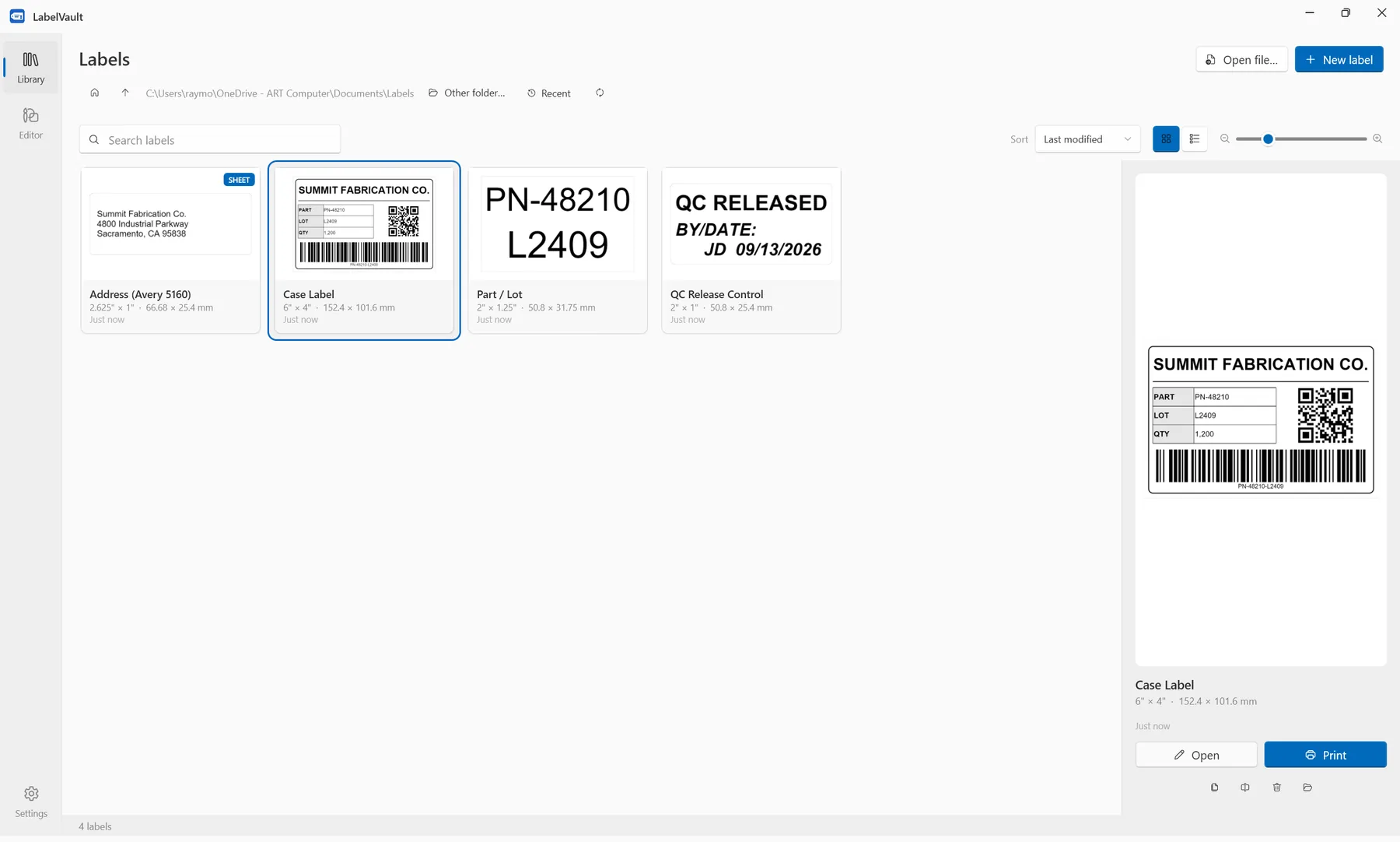 Library — thumbnails you can read
 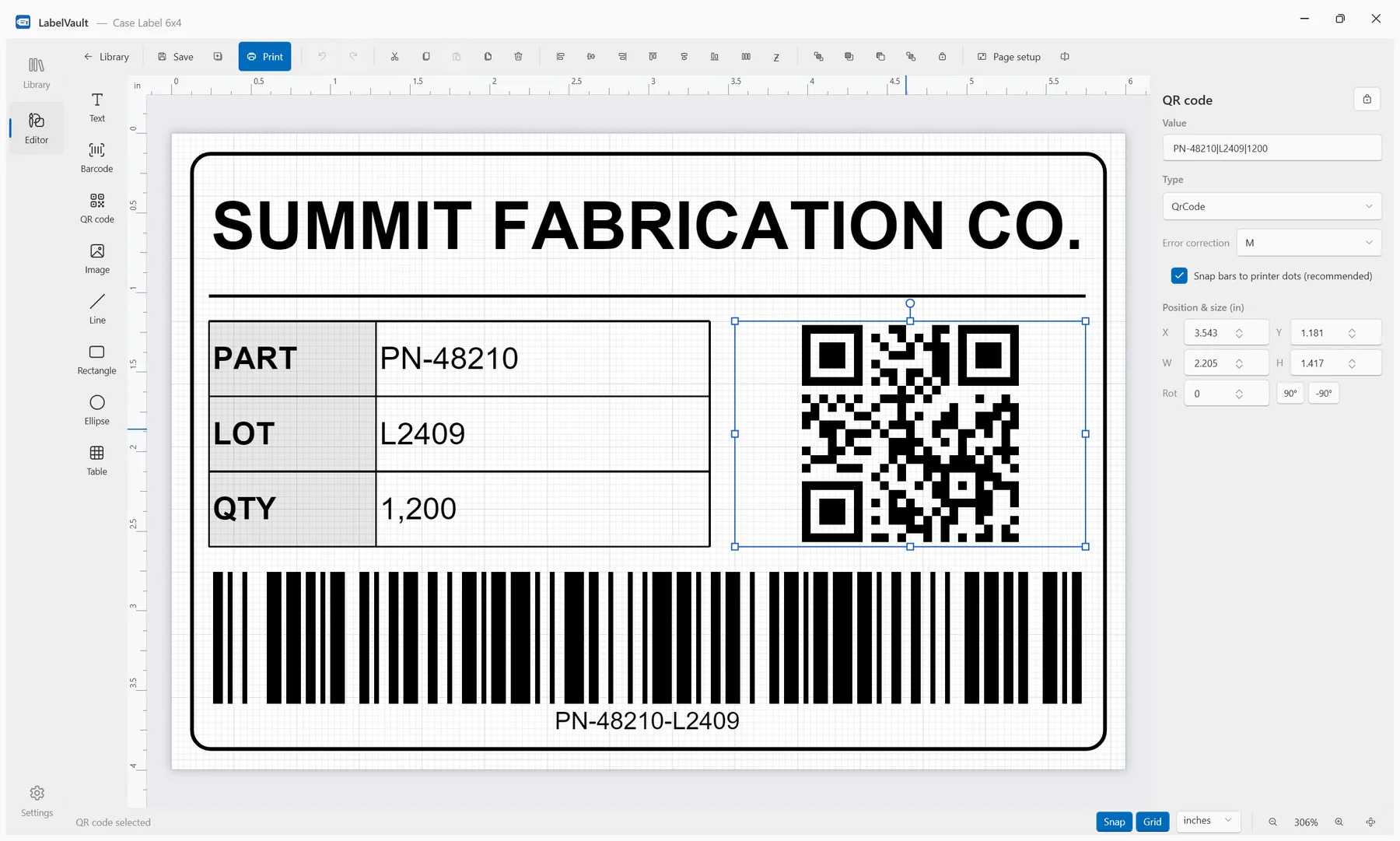 Editor — tables, barcodes, QR codes
 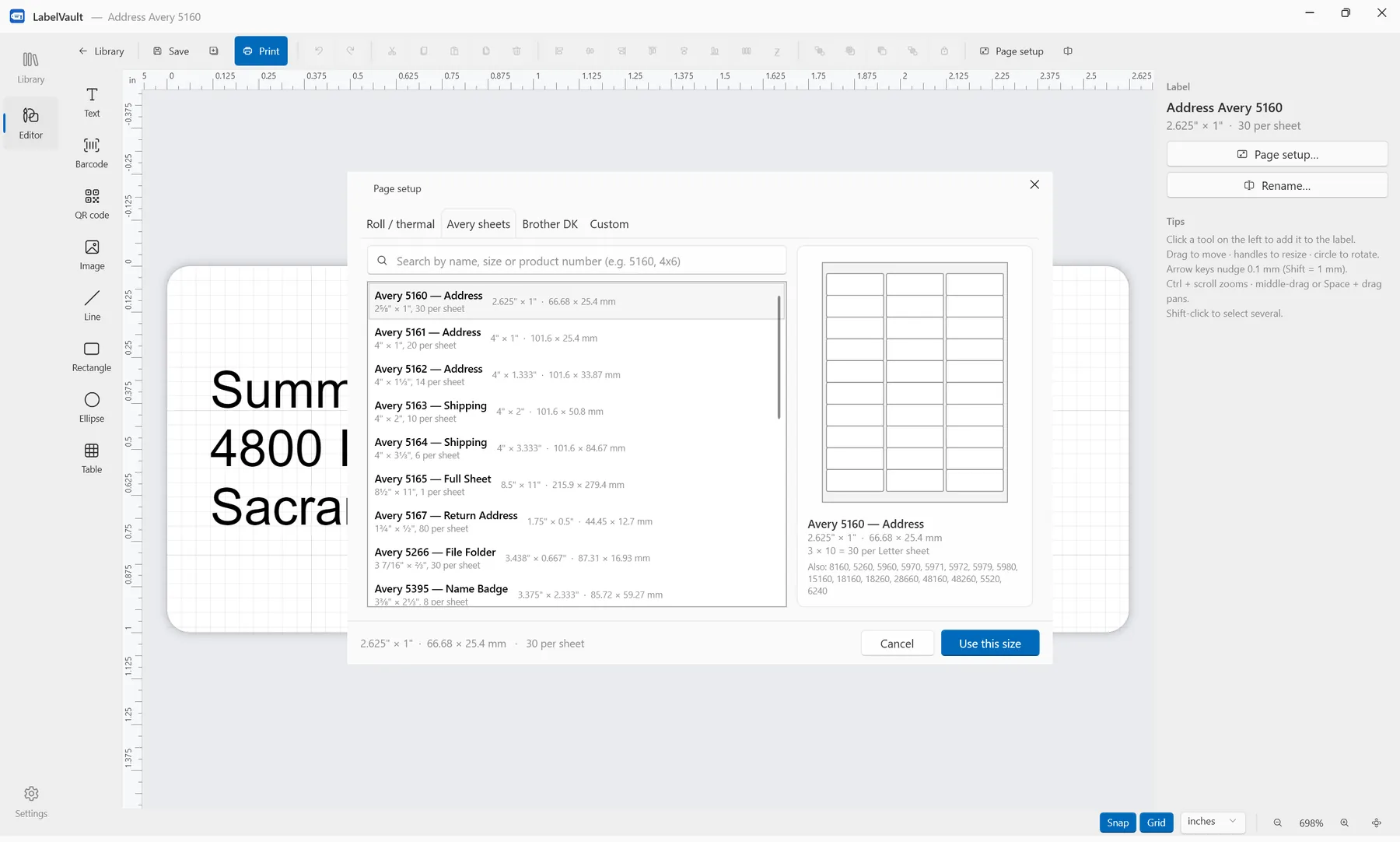 Sizes — Avery, roll, Brother DK, custom
 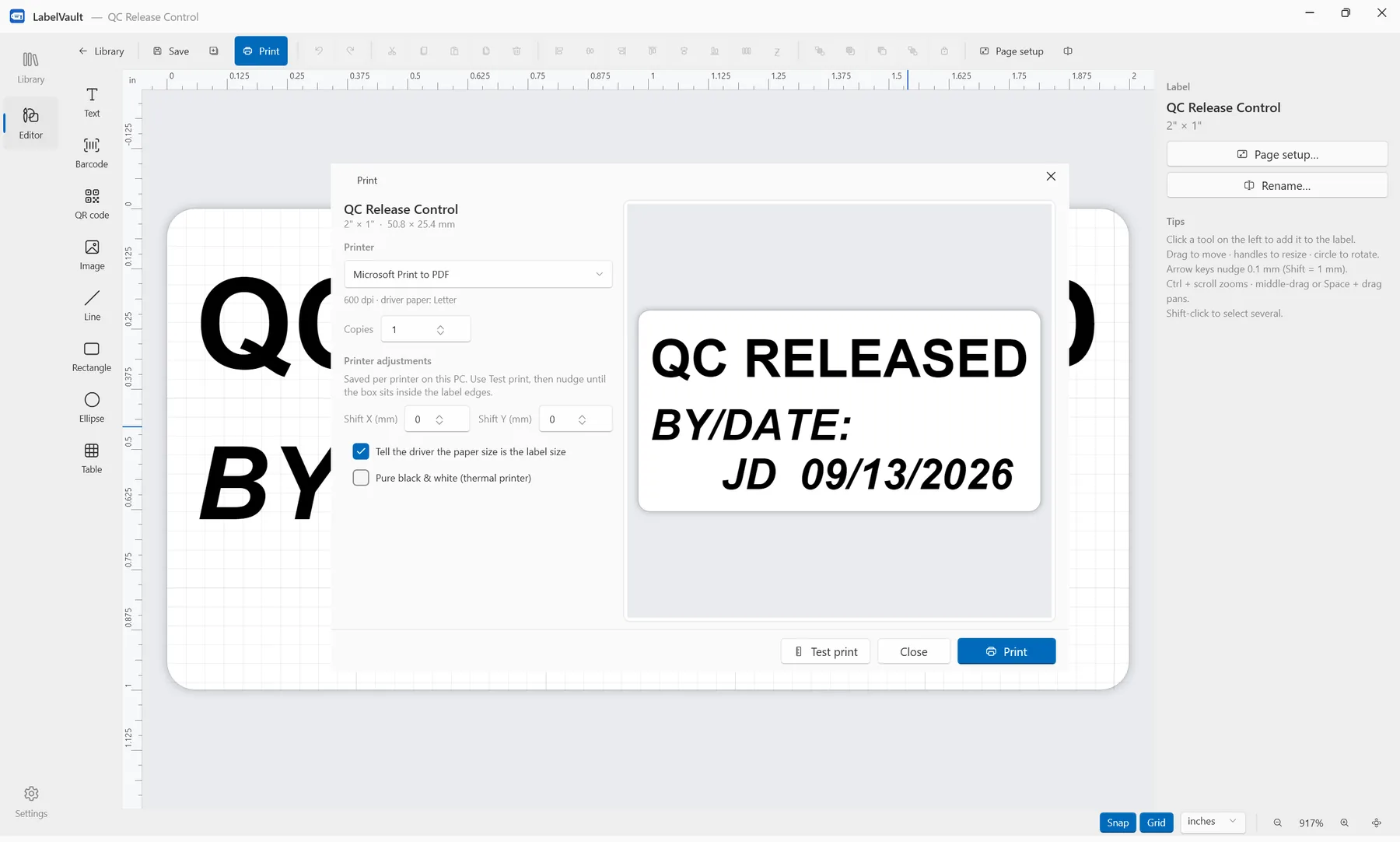 Print — any Windows printer
 Everything a Label Program Should Do
And none of the things that make them crash.
Any Windows Printer
Prints through the normal driver. Asks the printer for its resolution and renders the label at exactly that — 203, 300 or 600 dpi — so bars and text land dot-for-dot.
Barcodes That Scan
Code 128, Code 39, EAN-13/8, UPC-A, ITF-14, GS1-128, QR, and Data Matrix. Bars snap to whole printer dots. Every symbology is verified by decoding the printed pixels back.
Every Size You Need
33 thermal roll sizes, the Avery catalog for Letter and A4 (with all the alias numbers), Brother DK rolls — or type your own size, including multi-up sheet layouts.
Labels Are Files
One .lbv file per label in a folder you choose. Back it up, copy it, put the folder on Dropbox so every workstation shares the same labels. No database, no export step.
Works Offline. Always.
No login, no cloud templates, nothing on the startup path touches the internet. The license checks in quietly in the background and keeps working for a month if it cannot. Nothing you print ever leaves the building.
One Label per Row
Put {Column} in any text, barcode, QR code or table cell, point the Print window at a CSV, and you get a label for every row — a hundred bin locations, asset tags or sample IDs in one go. It tells you which fields it will fill before you print.
Never Lose Work
Unlimited undo, autosave every minute, and crash recovery that offers your unsaved label back on the next launch. Locked items can't be nudged by accident.
The Details That Matter
Small things that save time every single print.
{date} prints today's date in any format, with an optional offset for expiry dates Simple Pricing. One License per PC, Yours Forever.
Buy once — no subscription. Pick how many PCs print labels; volume pricing applies automatically.
One license per PC, yours forever, with a year of updates. Buy as many PCs as you need in one go — one key covers them all.
- Secure checkout by Stripe
- Key by email within a minute
- Try it free for 30 days first — sales are final
By buying you agree to the terms of sale and license. All sales are final.
Not sure yet? Download the free 30-day trial — everything unlocked, no card.
Built With
Frequently Asked Questions
What is LabelVault?
LabelVault is label design and printing software for Windows 10 and 11. You draw a label once — text, barcodes, QR codes, images, tables — save it as a file, and print it on any printer Windows can see: thermal roll printers, Avery sheets on a laser or inkjet, Brother DK rolls. It is a one-time purchase, not a subscription, and it works fully offline.
Is LabelVault a subscription?
No. LabelVault is a one-time purchase: $12.99 per PC, paid once, with volume pricing down to $7.99 per PC. The license never expires, includes a year of updates, and the version you have keeps working forever. There is no monthly fee, no account, and no cloud dependency.
How does the free trial work?
Install LabelVault and design as much as you like — that part is always free. The first time you print, choose Start free trial, enter your email, and a 30-day trial key arrives within a minute. Paste it in and everything is unlocked, including printing. No card, no account. One trial per PC.
What does it cost?
A one-time $12.99 per PC ($9.99 each for 5 or more, $7.99 each for 10 or more). No subscription. One key covers every PC in the order, and you can move seats between machines yourself.
Is it really mine forever?
Yes. The license never expires. It includes every update we release for a year; after that the version you have keeps working for good, and you can renew updates any time if you want the newest features.
Does it work with my label printer?
If Windows can print to it, LabelVault can. It prints through the printer's normal Windows driver and asks the driver for its resolution, so a 203 dpi thermal printer, a 300 dpi Brother, and a 600 dpi laser all get a label rendered at exactly their native dots. Designed around iDPRT (TSPL), Zebra (ZPL), Brother QL and Epson inkjet printers; any other printer with a Windows driver — DYMO, Rollo, Munbyn and the rest — works the same way.
Which label sizes are included?
Thermal roll sizes from 1×1 in to 4×8 in, the Avery catalog for Letter and A4 (5160, 5161, 5163, 5167, 8160, L7160 and more, plus their alias numbers), Brother DK die-cut and continuous rolls — and a Custom tab for anything else, including multi-label sheet layouts. The size travels inside the label file.
Where are my labels stored?
Each label is one .lbv file in a folder you choose — Documents\Labels by default. Point it at a shared drive or Dropbox folder and every PC in the shop sees the same labels. Nothing is stored online.
Does it need the internet?
Only for two moments: getting your key in the first place, and signing a PC out so another can use the seat. Day to day it checks in quietly in the background and keeps working for a month if it can't reach us. Nothing you design or print ever leaves the building.
Can I import labels from another program?
Not directly — other label programs use closed formats. Most labels take a few minutes to rebuild, and LabelVault ships with sample labels you can edit as a starting point.
Do I need admin rights to install it?
No. It installs into your user profile by default (an all-users install is offered too). The installer and the app are code-signed by Beckham Enterprises, LLC.
Download LabelVault
Free 30-day trial — design is always free, printing needs a license.
Download v1.0.18 for Windows Requirements: Windows 10 or later (64-bit) · 54 MB
No admin rights required — installs to your user profile · Signed by Beckham Enterprises, LLC
All versions · Manage your license
Need It to Do Something Specific?
LabelVault was built for a manufacturing client who needed label printing that simply works. If your shop needs a custom workflow — serial numbers, database merges, ERP integration — we build that too.
Talk to Us