

ScamEscape Family Alerts
Text messages, automated phone calls and email that tell a family member when someone may be trying to scam their loved one. Last updated October 25, 2026.
What the program is
ScamEscape is a free Windows program from Beckham Enterprises, LLC that protects older people from tech-support and remote-access scams. The family member who sets it up can choose people to be told when something suspicious happens on that computer. Those people get ScamEscape Family Alerts:
- Text messages and automated phone calls from (877) 834-2860, which read the alert out loud. A phone call also works for a landline.
- Email from
[email protected].
Alerts are sent only when one of these happens on the protected computer:
- the emergency escape key (Ctrl + Alt + E) was pressed;
- someone is controlling the computer from somewhere else through a remote-control program;
- a remote-control program was just installed or started;
- a bank or payment page may have been tampered with while it was on screen;
- a family member pressed "Send a test alert" while setting it up.
There is no marketing, no promotions and no advertising — ever. Alerts say only what happened and when, never what is on the screen.
How people sign up (opt-in)
- A family member installs ScamEscape on their loved one's computer and opens Family settings, protected by a family PIN.
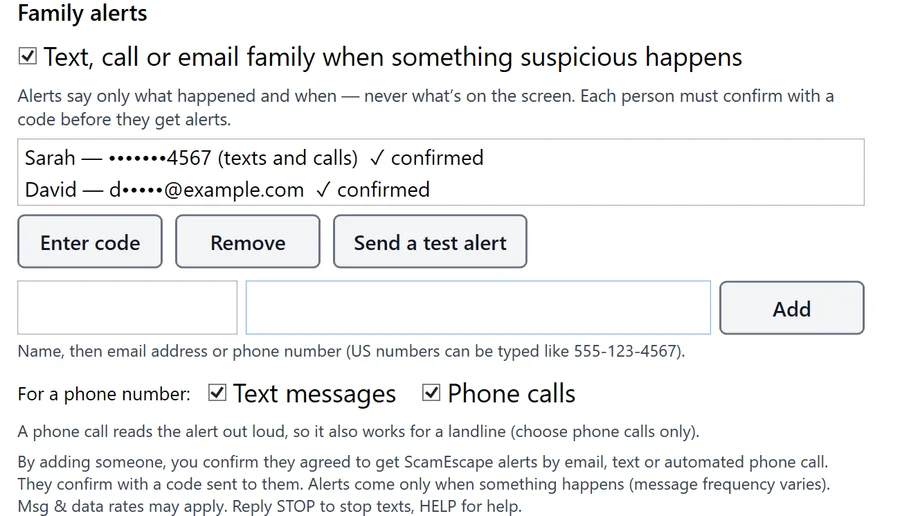
- Under Family alerts, they type the name and phone number (or email address) of each person who agreed to be told, and choose Text messages, Phone calls or both. The screen says, next to the Add button: "By adding someone, you confirm they agreed to get ScamEscape alerts by email, text or automated phone call. They confirm with a code sent to them. Alerts come only when something happens (message frequency varies). Msg & data rates may apply. Reply STOP to stop texts, HELP for help."
- That person then receives a one-time confirmation code — by text, or in an automated phone call if they chose calls only, or by email. Nothing more is sent unless they give that code back to the family member, who types it into ScamEscape. Entering the code is their consent.
- Once confirmed by text, they get one message confirming the sign-up, with how to get help and how to stop.
Message frequency and costs
Message frequency varies: alerts come only when something happens, usually none in a month. A computer can trigger at most 20 alerts a day, and the same alert is not repeated within five minutes. Message and data rates may apply, depending on your mobile plan. The program is free; we never charge for alerts.
Help, and how to stop
- Stop texts: reply STOP to any text from (877) 834-2860. You will get one message confirming you have been unsubscribed, and no more texts. To start again, reply START, or ask the family member to add and confirm you again.
- Help: reply HELP for help, or contact us.
- Stop calls or email: ask the family member to press Remove next to your name in ScamEscape's Family settings, or contact us and we will remove you within two business days.
Carriers are not liable for delayed or undelivered messages.
Sample messages
Confirmation code (sent by Twilio Verify): "Your ScamEscape verification code is: 123456"
After confirming: "ScamEscape: you'll get a text if someone may be trying to scam Mom's laptop. Msg frequency varies. Msg & data rates may apply. Reply HELP for help, STOP to opt out."
An alert: "ScamEscape alert for Mom's laptop: The emergency escape key (Ctrl+Alt+E) was just pressed. Call them now from your own phone. If a stranger is on the line with them, help them hang up. Never let anyone talk them into sending money or gift cards. Reply STOP to stop alerts."
A phone call says: "This is an automated ScamEscape alert for Mom's laptop. The emergency escape key was just pressed. Call them now from your own phone…", then repeats it once.
Privacy
Phone numbers, email addresses and sign-up consent are used only to send these alerts. We never sell, rent or share mobile numbers or text-message opt-in information with third parties or affiliates for marketing or promotional purposes. They go only to the companies that deliver the alerts for us (Twilio for texts and calls, Resend for email), for that purpose alone. The full details are in our privacy policy; our terms also apply.
Contact
Beckham Enterprises, LLC, Vacaville, California, USA — contact us.